
Customers come back.Again and again.
Loya is a loyalty program for cafés, salons, shops, travel agencies, photo studios and pet groomers. Digital cards instead of paper ones, a scanner right in your phone, smart campaigns and clear analytics — all in one app.
Stamps, discounts and bonuses — right on the customer’s phone.
Customers join in 10 seconds, no app needed.
Who comes back, who’s gone and what drives revenue.
Emails and Telegram go out by themselves — at the right moment.
Design your venue’s card in a minute
Logo, colours, coffee cups or paws instead of stamps, a holiday look — and see right away how the card looks in a guest’s Apple and Google Wallet.
For your business
Pick your field — we’ll show how Loya works for you.
One app — your whole chain
Cafés on two streets, a salon and a kiosk, several tills — one subscription key, and every location in plain sight.
A client gets a stamp at one location and every location sees it. Or each location keeps its own base — your choice.
Home shows your location; one tap opens any other location or the whole chain. Same in “Access from home”.
Install Loya on the new location’s computer or phone and enter the same key — the app asks the rest.
Starter — up to 3 locations · Pro — up to 10 · need more? We’ll add them
Plans
Start free. No per-customer fees or hidden extras — move to a paid plan once Loya starts paying off.
- Up to 10 customers and 15 cards — enough to try it calmly
- Stamp cards, discounts and spend rewards
- Scanner — laptop camera, phone or USB scanner
- Guests sign up themselves via a QR at the counter
- Unlimited customers and cards
- Cards go straight to Apple Wallet and Google Wallet, updated after every purchase
- Sign-up in 10 seconds: name and email — and the card is on the guest’s phone
- Emails that send themselves: birthdays, “we miss you”, “one stamp to go”
- Promotions: double stamps, a welcome bonus, refer a friend
- Analytics you can actually read: who came back, average ticket, best hours
- Up to 3 locations sharing one guest list
- We set it all up for you for free: sign-up page design, Wallet cards, logo and promotions
- Everything in Starter
- Up to 10 locations and devices — one subscription for the whole chain
- Stats for every location, every staff member and the whole chain
- Online booking, till receipts and stock tracking — across the chain
- Done-for-you setup for the whole chain: look, Wallet cards, booking and promotions
- Priority support
Send us your logo and a couple of photos — we’ll style your sign-up page, Apple & Google Wallet card, online booking and promotions in your colours. No extra fees, on any paid plan.
No fees on purchases, no extra charges for Wallet, campaigns or the scanner. Cancel in one click.
Compare plans in detail
| Free | Starter | Pro | |
|---|---|---|---|
| Clients and cards | up to 10 clients | ∞ | ∞ |
| Stamps, discounts, points | ✓ | ✓ | ✓ |
| Scanner: camera, phone or USB | ✓ | ✓ | ✓ |
| QR self sign-up for guests | ✓ | ✓ | ✓ |
| Card in Apple and Google Wallet | — | ✓ | ✓ |
| Emails and campaigns to clients | — | ✓ | ✓ |
| Locations sharing one guest base | 1 | 3 | 10 |
| We set up the design for you, free | — | ✓ | ✓ |
| Stats for every location and staff member | — | — | ✓ |
| Priority support | — | — | ✓ |
Paper cards don’t work anymore
They get lost, forgotten and faked. And you don’t know who your best customers are or who left for a competitor.
Customers lose their cards
A digital card is always in their phone — by email, in Telegram or in Google Wallet.
You can’t see who left
Loya notices who’s been away longer than usual and tells you how to win them back.
Advertising is expensive
Keeping a customer costs less than finding a new one. Loya reaches the right people at the right time.
Up and running in 10 minutes
No hardware to buy — a computer and a phone are enough.
Customers sign up themselves
They scan the QR at the counter, fill in a short form and get their card on their phone instantly.
You scan the card
With a USB scanner, the laptop camera or your phone. Stamps, discounts and totals are counted automatically.
Customers come back
The reward is close, and Loya reminds them about it by email at the right time. Repeat purchases grow.
What it looks like in a coffee shop
Example: the Black Rich coffee shop switched from paper cards to Loya.
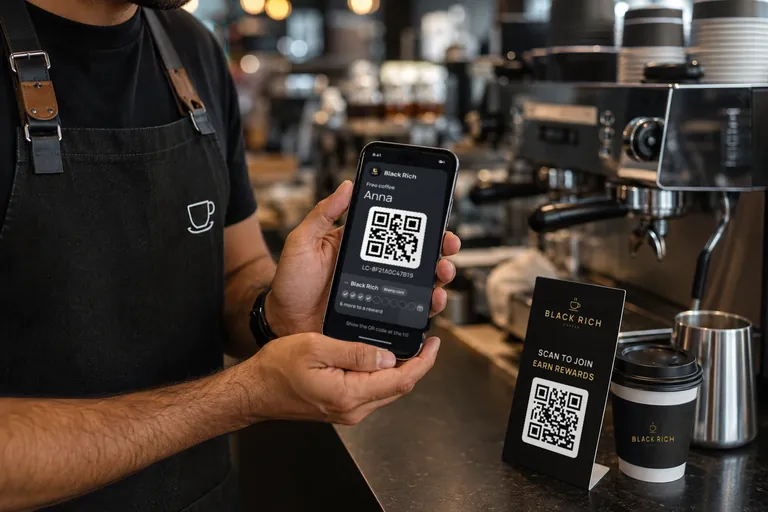
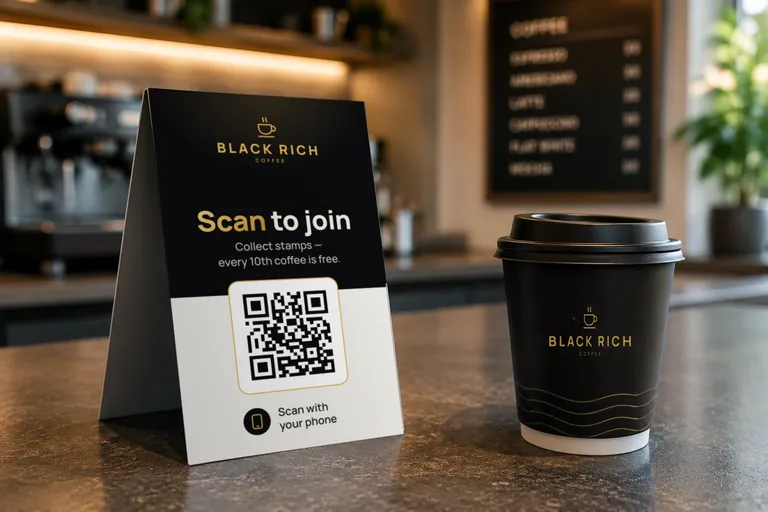
Take a look inside
Real screens from the app — beautiful, clear and in your language.
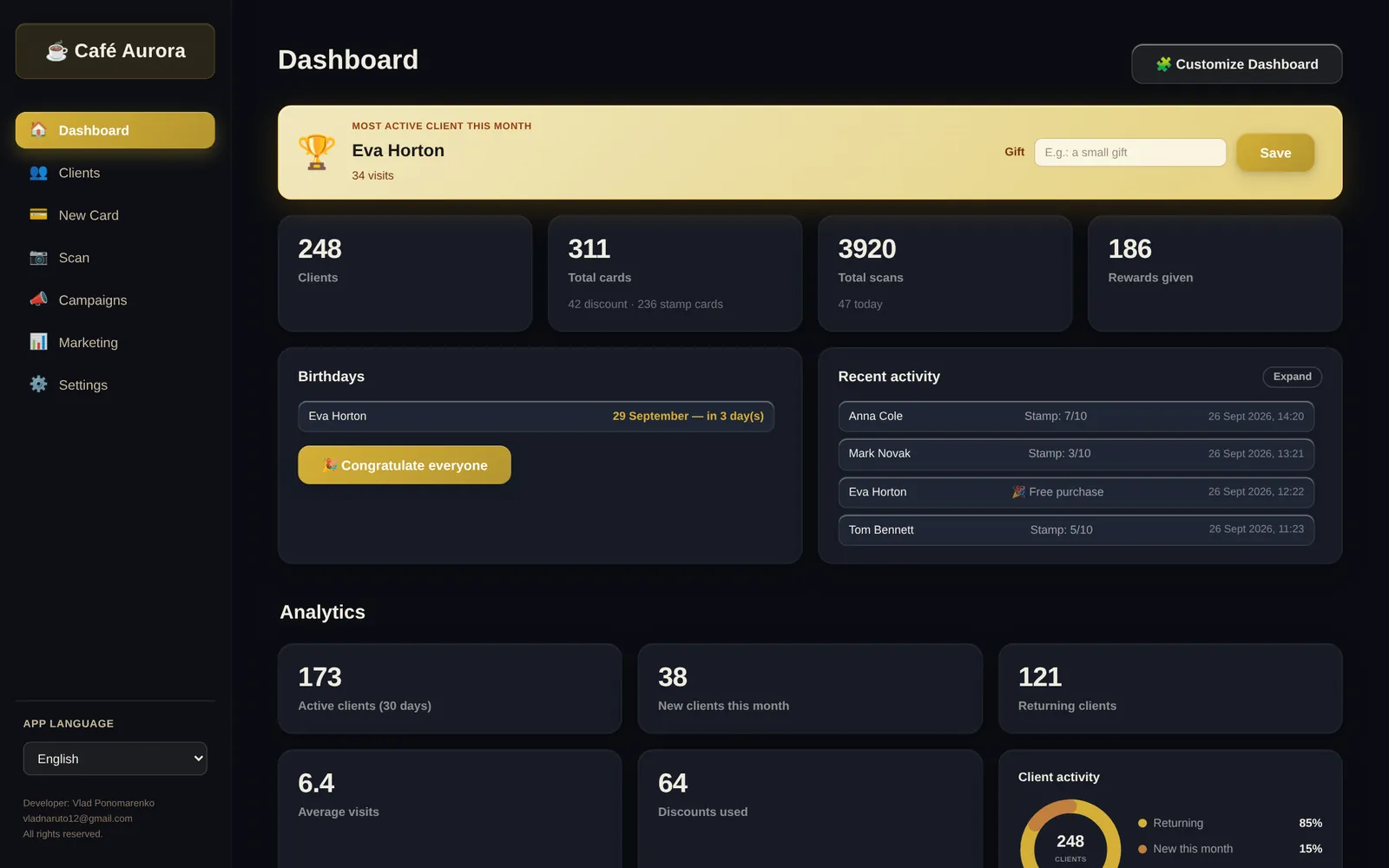
Your whole day at a glance: client of the month, birthdays, recent purchases and key numbers.
Everything you need in one app
No juggling five different subscriptions, no technical skills required.
Three card types
Stamp cards (“10th coffee free”), discount cards and spend cards with a bonus after a target amount.
A phone instead of a scanner
Open the QR on screen and a staff phone becomes a wireless scanner. The guest’s card shows up instantly.
Automated emails
Emails to lapsed customers, those one step from a reward, newcomers and birthdays — sent automatically, once a day.
“What to do today”
Smart tips: who to remind about a reward, who to win back, whose birthday it is. One click and the campaign is ready.
Analytics that make sense
Revenue, average purchase, loyalty funnel and a heatmap: when customers come and when to run promotions.
Promotions & protection
Double stamps in quiet hours, refer a friend, review requests — plus protection against repeat scans.
Staff and locations
Every cashier gets their own PIN and permissions. See who stamped how much and which location earns more.
Wallet cards and printing
Google Wallet and Telegram for customers — and for plastic lovers, printable cards and QR stickers.
Your data stays yours
The database lives on your computer with a daily backup. Works even without internet.
Online booking
For salons and barbershops: guests pick a service, a specialist and a time, get a reminder, and the visit counts on their card.
Google reviews
After a visit guests rate it: happy ones are invited to review you on Google, unhappy ones write to you privately.
Invite a friend
Every guest has a personal invite link in their Wallet card. The friend gets a gift, the inviter a bonus after the friend’s first visit.
Paper card or Loya
An honest comparison — no made-up numbers.
How much will you earn with Loya?
Move the sliders — an estimate for your business.
Frequently asked questions
How does the free trial work?
Download the app and click “Try 14 days free” — just an email, no card. Every feature works for 14 days. Afterwards subscribe on the website or stay on the free version (up to 10 customers) — your data stays.
Do I need to buy a scanner?
No. You can scan with the laptop camera or a staff member’s phone. A regular USB barcode scanner works too.
Do customers need to install an app?
No. The card arrives by email, in Telegram or in Google Wallet — the customer just shows the QR on their phone.
Where is customer data stored?
On your computer, not on someone else’s server. The app backs up automatically every day and works offline.
Which devices does it run on?
Windows 10 and 11 computers (installer or Microsoft Store) and Android 7+ tablets and phones (an .apk file). One-click installation, automatic updates.
How do I cancel?
Anytime, in one click from the link in your confirmation email — no calls, no explanations.
Can I import customers from another app?
Yes — upload a CSV table (for example from Excel) and your customers appear in Loya.
Which languages does the app support?
English, Slovak, Russian and Ukrainian. Customer emails go out in each customer’s own language.
What happens to my data if I stop paying?
Nothing is lost: the database lives on your computer. The app switches to the free mode (up to 10 active clients), and all clients and history stay. Renew the subscription and everything works as before.
Can I switch from Starter to Pro?
Yes, any time: choose Pro on the website with the same email — your key stays the same and the app picks up the new plan. The plans differ only in the number of locations: Starter up to 3, Pro up to 10.
How many devices can one location have?
A location is a venue, and it can have several devices: the till computer, a barista’s phone, a tablet. All devices on one key count together: Starter — up to 3, Pro — up to 10. Need more? Write to us and we’ll add them.
Start bringing customers back today
Pick whichever way suits you — it’s the same app, and the 14-day trial starts after installation.
Microsoft Store
Install and get automatic updates through the Windows store.
Open in Microsoft StoreAndroid app
For tablets and phones: the same program, every feature. An .apk file, always the latest version.
Download for AndroidWindows 10 or 11 · Android 7+ · free for up to 10 customers